
Blogs
10 Essential Server Hardware Components You Can’t Skip
October 11, 2024
Server Infrastructure Guide: 7 Critical Facts You Must Know
October 31, 2024
Your servers are the backbone of your business. Every website visit, customer transaction, and internal operation depends on them. But without proper server maintenance, even the most advanced infrastructure can quickly become unreliable, slow, or vulnerable to security threats.
In 2026, server maintenance is no longer optional. It is a business-critical process that protects uptime, data, and performance. Whether you manage one server or hundreds, understanding server maintenance helps you prevent downtime, reduce costs, and stay competitive.
This guide explains what server maintenance is, why it matters, and how to manage it effectively. You will also learn when to handle maintenance in-house and when to rely on professional server maintenance services.
Table of Contents
- What is Server Maintenance?
- Why is Server Maintenance Important?
- Types of Server Maintenance
- Server Maintenance Checklist
- Windows Server Maintenance Key Considerations
- Linux vs Windows Server Maintenance
- How to Create a Server Maintenance Plan
- In House vs Outsourced Server Maintenance
- Common Server Maintenance Challenges
- Pro Tips for Effective Server Maintenance
- Pros and Cons of Server Maintenance
- Server Maintenance Tools
- Conclusion
What is Server Maintenance?
Server maintenance is the ongoing process of keeping a server healthy, secure, and fully operational. It includes monitoring performance, applying updates, fixing issues, and planning for future growth.
In simple terms, server maintenance ensures that your server does what it is supposed to do without interruptions.
What does server maintenance include?
- Installing software and security updates
- Monitoring server performance and usage
- Checking and replacing failing hardware
- Running backups and testing recovery
- Fixing errors before they cause downtime
When maintenance server tasks are ignored, servers become slow, unstable, and vulnerable to cyber attacks. Over time, this leads to outages, data loss, and frustrated users.
Server support and maintenance also play a major role in scalability. As your business grows, your servers must keep up without crashing or slowing down.
Helpful internal resources:
Learn more about downtime expectations here: How Long Does Server Maintenance Last
Why is Server Maintenance Important?
Server maintenance is not just an IT task. It directly impacts business performance, customer trust, and revenue.
Performance optimization
Regular maintenance keeps servers fast and responsive. It removes unnecessary processes, balances workloads, and prevents performance bottlenecks.
Security assurance
Cyber threats evolve daily. Server maintenance services include patching vulnerabilities, updating firewalls, and monitoring suspicious activity to prevent breaches.
Data integrity and backups
Servers store valuable business data. Maintenance ensures backups run correctly and recovery processes work when needed.
Cost efficiency
Fixing problems early costs far less than emergency repairs. Preventive server maintenance reduces downtime and expensive recovery efforts.
Compliance and uptime
Many industries require strict uptime and security standards. A reliable server maintenance company helps meet these requirements consistently.
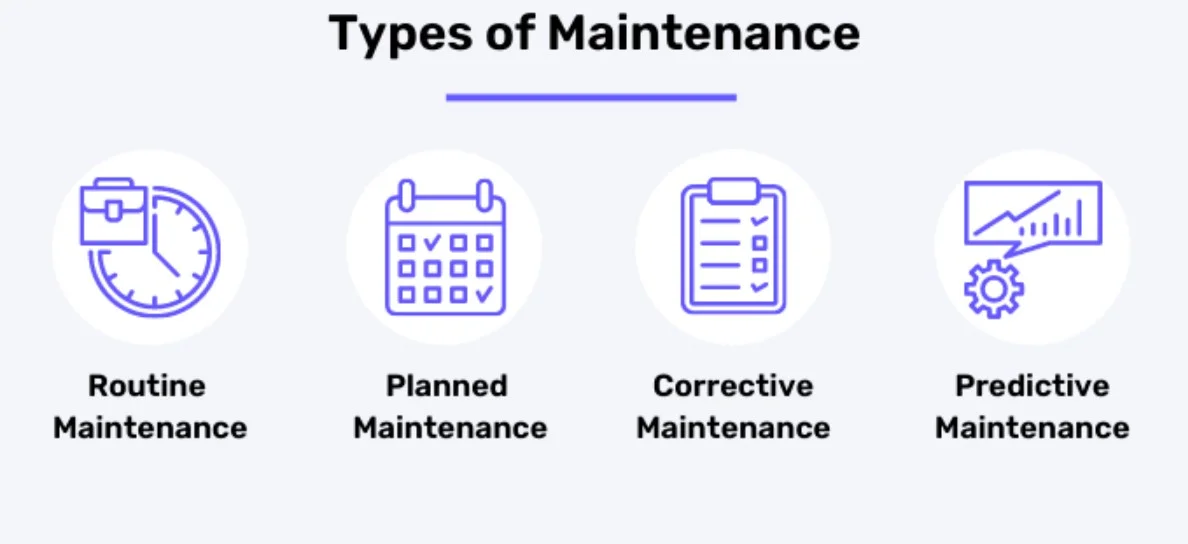
Types of Server Maintenance
Server maintenance is not a single task. It includes different approaches depending on the situation.
Preventive maintenance
This is routine maintenance performed to prevent issues. It includes updates, health checks, and performance tuning. Preventive maintenance is the foundation of computer server maintenance.
Predictive maintenance
Predictive maintenance uses monitoring tools and historical data to identify early warning signs. This allows teams to act before failures occur.
Corrective maintenance
Corrective maintenance happens after a failure. It includes fixing hardware, restoring backups, and resolving software issues quickly.
Scheduled maintenance
Scheduled maintenance is planned and performed during low traffic hours. This reduces disruption while keeping systems updated.
Together, these maintenance server types create a balanced and reliable maintenance strategy.
Server Maintenance Checklist
A server maintenance checklist helps teams stay consistent and avoid missing critical tasks.
| Task Type | Frequency | Action Items |
| Hardware checks | Weekly | Inspect drives, fans, and power units |
| Software updates | Monthly | Apply OS and application updates |
| Backups | Daily | Verify and test recovery points |
| Security audits | Monthly | Scan for vulnerabilities |
| Performance monitoring | Weekly | Check CPU, RAM, and disk usage |
This checklist applies to both Linux and Windows Server maintenance environments and supports long-term stability.

Windows Server Maintenance Key Considerations
Windows Server maintenance requires special attention due to frequent updates and security requirements.
Key focus areas include:
- Automated update management
- Patch testing before deployment
- Optimizing remote desktop performance
- Configuring security policies correctly
Regular Windows Server maintenance reduces crashes and improves system reliability in enterprise environments.
Linux vs Windows Server Maintenance
Both platforms require maintenance, but their approaches differ.
Windows Server
- Frequent security updates
- User-friendly management tools
- Higher resource usage
Linux Server
- Less frequent updates
- Strong stability and performance
- Requires command-line expertise
Regardless of the platform, server support and maintenance ensure consistent performance.
For real-time insights and alerts, explore: Server Monitoring
How to Create a Server Maintenance Plan
A structured maintenance plan keeps systems stable and predictable.
Step 1: Audit your infrastructure
Identify server applications, workloads, and risks.
Step 2: Define maintenance intervals
Decide daily, weekly, and monthly tasks.
Step 3: Automate monitoring
Use tools to track uptime performance and security.
Step 4: Implement backups
Ensure backups are automatic and tested regularly.
Step 5 Review and improve
Update the plan monthly based on performance data.
This approach improves server maintenance services’ efficiency and reduces manual errors.
In House vs Outsourced Server Maintenance
Choosing between internal teams and a professional server maintenance company depends on cost, expertise, and availability.
| Criteria | In House | Outsourced |
| Cost | High staffing costs | Predictable monthly plans |
| Expertise | Limited skill range | Certified engineers |
| Availability | Business hours | 24 7 365 |
| Security | Depends on the staff | Enterprise-level protection |
Get reliable 24 7 support with professional server management services
Common Server Maintenance Challenges
Downtime during updates
Solution: Schedule maintenance during low traffic periods.
Lack of automation
Solution: Use monitoring and patch management tools.
Aging hardware
Solution: Plan hardware refresh cycles.
Poor documentation
Solution: Maintain clear maintenance logs.
Security blind spots
Solution: Perform regular audits and vulnerability scans.
Pro Tips for Effective Server Maintenance
- Automate alerts and performance monitoring
- Schedule updates outside business hours
- Test disaster recovery monthly
- Use virtualization for flexibility
Learn more about virtualization benefits: Server Virtualization
Maintain your online assets alongside servers: Website Maintenance
Pros and Cons of Server Maintenance
Pros
- Improved uptime and reliability
- Stronger security
- Better performance
- Longer hardware lifespan
Cons
- Requires technical expertise
- Planned downtime
- Cost of professional support
Despite the challenges, the benefits of proper server maintenance far outweigh the drawbacks.
Server Maintenance Tools
Some popular tools used by server maintenance services include:
- Nagios for monitoring
- PRTG Network Monitor
- SolarWinds
- ManageEngine
- Zabbix
These tools help automate checks and detect issues early.
Conclusion
Server maintenance is not just an IT responsibility. It is a business necessity. From performance and security to compliance and cost control, proper server maintenance keeps your operations running smoothly.
Whether you manage a single server or a large infrastructure, a proactive approach ensures long-term stability. With expert server support and maintenance, businesses can focus on growth instead of downtime.
Let professionals handle the complexity. Explore HostNOC’s Server Management Services and keep your infrastructure future-ready.
Frequently Asked Questions About Server Maintenance

What is server maintenance and why is it important?
Server maintenance is the process of keeping servers secure, reliable, and optimized. It prevents downtime, security risks, and performance issues.
How often should servers be maintained?
Basic monitoring should be continuous. Updates and audits are typically done weekly or monthly, depending on workload.
What does a server maintenance checklist include?
It includes hardware checks, updates, backups, security audits, and performance monitoring.
Who provides the best server maintenance services?
A reliable server maintenance company offers 24 7 support, certified engineers, and proactive monitoring.
How long does server maintenance take?
It depends on the task. Minor updates take minutes while major maintenance may take hours. Learn more here: How Long Does Server Maintenance Last

Muhammad Osama
Muhammad Osama a qualified professional with ground-breaking experience in developing SEO campaigns, analytics, and monitoring the ranking in Google search pages. A clear communicator with an experience of digital marketing and improving brand search ranks.
Featured Post

Best Dedicated Server Guide for Maximum Performance in 2026
A dedicated server gives you an entire physical server with 100% exclusive resources, no sharing CPU, RAM, or storage with anyone else. It is the best […]

saad ullah
March 30, 2026
How To Fix a DNS Server Not Responding? Fix It Fast Today
Table of Contents Key Takeaways: What is a DNS Server? What Does “DNS Server Not Responding” Mean? Common Causes of DNS Server Not Responding 1. Network […]
saad ullah
March 27, 2026

Linux Mint vs Ubuntu: 10 Ultimate Comparison Points
Table of Contents Key Takeaways: Understanding Ubuntu Linux and Mint Linux Linux Mint vs Ubuntu: Are Linux and Ubuntu the Same? Linux Mint vs Ubuntu: Core […]
saad ullah
March 11, 2026





