


Ransomware attacks are one of the most expensive threats a business can face today. A single infected laptop can lock every file on your network, stop sales, and expose customer data within hours. According to the Verizon 2025 Data Breach Investigations Report, ransomware was present in 44% of breaches, and it showed up in 88% of breaches at small and medium-sized businesses.
The good news is that most ransomware attacks are preventable. Attackers usually get in through the same few doors: phishing emails, stolen passwords, unpatched software and exposed remote access. Close those doors, and you remove most of the risk.
🔑 Key Takeaways
- Ransomware attacks target businesses of every size, but small and mid-sized companies are hit the hardest.
- Offline, tested backups are your strongest defense, because they let you recover without paying a ransom.
- Patching, MFA and least-privilege access shut the most common entry points attackers use.
- Employee training stops phishing emails, which remain a leading way ransomware gets in.
- A written incident response plan cuts downtime and confusion when an attack happens.
In this guide, HOSTNOC explains how ransomware attacks work, the warning signs to watch for, and seven proven ways to protect your business from ransomware before it is too late.
☰ Table of Contents (click to expand)
- What Are Ransomware Attacks?
- Types of Ransomware Attacks
- How Do Ransomware Attacks Work?
- Why Are Businesses a Prime Target?
- Common Signs of a Ransomware Attack
- 7 Effective Ways to Protect Your Business from Ransomware Attacks
- Ransomware Protection Checklist
- Ransomware Protection for Remote and Hybrid Teams
- What to Do If You Are Hit by Ransomware
- Common Ransomware Myths
- Why Hosting Matters for Ransomware Protection
- Conclusion
- FAQs
What Are Ransomware Attacks?
Ransomware attacks use malicious software to encrypt your files, servers or backups. Once the data is locked, the attacker demands payment, usually in cryptocurrency, in exchange for a decryption key.
Modern ransomware gangs also steal data before they encrypt it. This is called double extortion. Even if you restore from backup, they threaten to leak your customer records, contracts or financial files unless you pay.
Paying is no guarantee. Many victims never get all their data back, and paying marks you as a target for future attacks. That is why prevention matters far more than recovery.
Types of Ransomware Attacks
Not all ransomware attacks look the same. Knowing the main types helps you choose the right defenses.
Crypto Ransomware
This is the most common type. It encrypts files, databases and documents, then demands payment for the key. Your systems still turn on, but your data is unreadable.
Locker Ransomware
Locker ransomware blocks access to the whole device instead of encrypting individual files. Users see a lock screen with a ransom note and cannot use the computer at all.
Double and Triple Extortion
In double extortion ransomware attacks, criminals steal data first and then encrypt it. Triple extortion adds more pressure, such as DDoS attacks on your website or direct threats to your customers and partners.
Ransomware-as-a-Service (RaaS)
Ransomware-as-a-Service lets less skilled criminals rent ready-made ransomware kits from organized gangs and share the profits. RaaS is a major reason ransomware attacks have become so widespread, because almost anyone can now launch one.
How Do Ransomware Attacks Work?
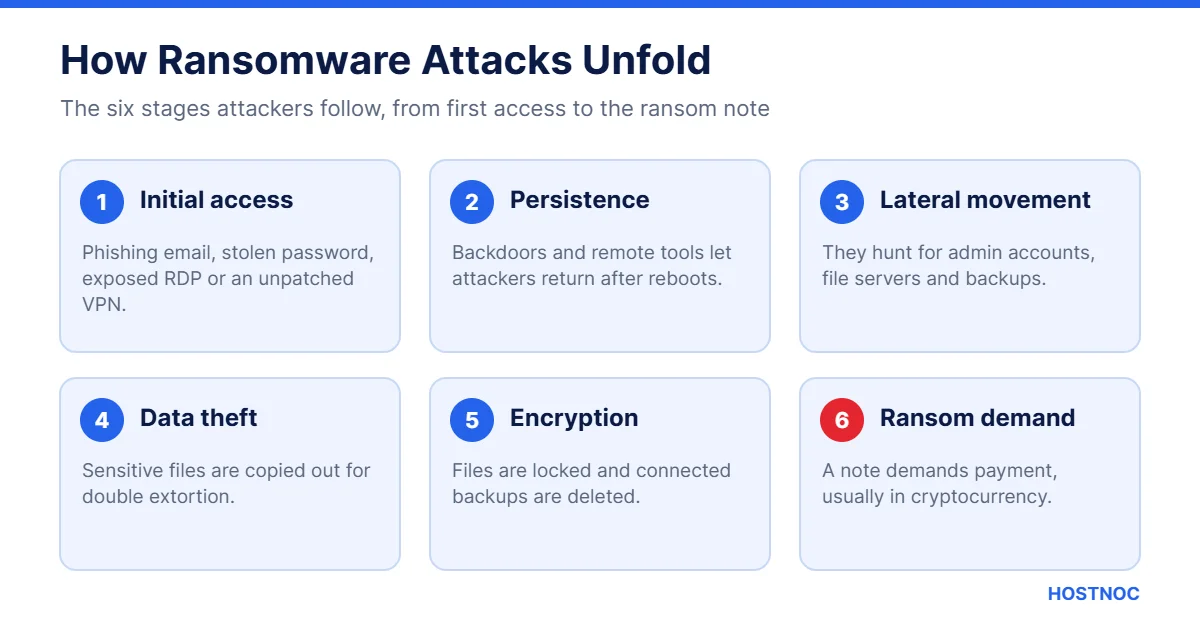
Most ransomware attacks follow a predictable path. Knowing each stage helps you spot and stop an attack early.
- Initial access: The attacker gets in through a phishing email, a stolen password, an exposed RDP port or an unpatched VPN.
- Persistence: They install tools that let them come back, even after a reboot.
- Lateral movement: They move across the network, looking for admin accounts, file servers and backups.
- Data theft: Sensitive files are copied to an outside server for extortion.
- Encryption: The ransomware runs, locks files and deletes local backups.
- Ransom demand: A note appears with payment instructions and a deadline.
The time between first access and encryption can be just a few days. Strong monitoring gives you a chance to catch the attacker during the quiet middle stages.

Why Are Businesses a Prime Target?
Attackers go where the money is. Businesses hold valuable data, depend on uptime and often pay to get back online quickly. Smaller firms are especially attractive because they tend to have fewer security staff and weaker backups.
The Verizon report found the median ransom paid was $115,000, while 64% of victims refused to pay. Even without a payment, the real cost includes downtime, lost sales, legal fees, recovery work and damage to your reputation.
The Real Cost of Ransomware Attacks
The ransom is often the smallest part of the bill. When ransomware attacks a business, the hidden costs pile up quickly:
- Downtime: Orders, bookings and support stop while systems are offline.
- Recovery work: IT teams or outside experts must rebuild servers and restore data.
- Legal and compliance costs: Data breaches can trigger notification duties, audits and fines.
- Lost trust: Customers may move to competitors if they believe their data is unsafe.
- Higher insurance premiums: Cyber insurers raise rates after a claim, or demand stronger controls.
For many small businesses, a long outage is the real danger. Weeks without access to customer records or invoices can threaten the survival of the company.
Industries Most at Risk
Ransomware attacks hit every sector, but some are targeted more often because downtime is so painful for them:
- Healthcare providers and clinics
- Schools, colleges and universities
- Manufacturing and logistics companies
- Law firms and accounting practices
- Local government and public services
- Retail and e-commerce businesses
If your business handles sensitive records or cannot afford even a short outage, assume you are on an attacker’s list and plan accordingly.
You cannot negotiate your way out of a ransomware attack that you were never prepared for. Preparation is the only real protection.
Common Signs of a Ransomware Attack
Ransomware attacks rarely appear out of nowhere. Watch for these early warning signs:
- Unexpected new admin accounts or password resets
- Antivirus or endpoint security tools being disabled
- Large amounts of data moving to unknown external servers
- Unusual logins at odd hours or from new locations
- Files suddenly renamed with strange extensions
- Backup jobs failing or backup files being deleted
If you notice any of these, isolate the affected machines right away. Our guide on how to spot a ransomware attack covers more red flags in detail.
7 Effective Ways to Protect Your Business from Ransomware Attacks
The steps below work together. No single tool stops every attack, but layered defenses make your business a much harder target.
1. Back Up Your Data and Keep Copies Offline
Backups are the most important defense against ransomware attacks. If you can restore clean data quickly, the attacker loses their leverage.
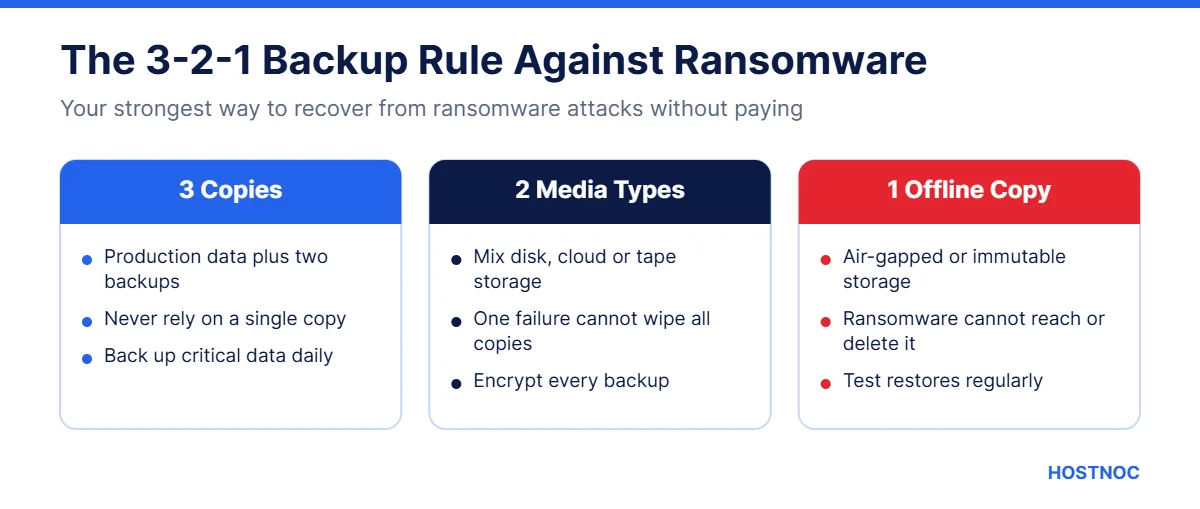
Follow the 3-2-1 rule: keep three copies of your data, on two different types of storage, with one copy offline or immutable. Attackers actively hunt for backups, so an offline or write-protected copy is essential.
Test your restores regularly. A backup you have never restored is only a hope, not a plan.
2. Keep Software and Systems Patched
Unpatched software is one of the easiest ways into your network. Attackers scan the internet for known flaws in VPNs, firewalls, email servers and web apps, then exploit them within days of disclosure.
- Turn on automatic updates for operating systems and browsers
- Patch internet-facing systems first, such as VPNs and remote access tools
- Remove software you no longer use
- Track end-of-life systems and plan replacements
A managed server management service can handle patching for you, so critical updates never slip through the cracks.
3. Turn On Multi-Factor Authentication Everywhere
Stolen passwords are a major cause of ransomware attacks. Multi-factor authentication (MFA) adds a second check, such as an app prompt or hardware key, so a leaked password alone is not enough.
Start with email, VPN, remote desktop, cloud admin panels and backup consoles. These are the accounts attackers want most.
4. Train Employees to Spot Phishing
Phishing emails remain a top delivery method for ransomware. One click on a fake invoice or shared document can start the whole chain.
Run short, regular training sessions. Use simulated phishing tests to see who needs more help, and make it easy for staff to report suspicious emails without fear of blame. Learn more in our guide to spear phishing attacks.
Protect Your Business on Secure Infrastructure
Run your workloads on HOSTNOC servers with expert management, monitoring and support, so your team can focus on growth.
5. Limit Access with Least Privilege
Not every employee needs admin rights. When users have only the access they need, ransomware has less room to spread.
- Remove local admin rights from everyday user accounts
- Separate admin accounts from daily email and browsing accounts
- Review access whenever someone changes roles or leaves
- Segment your network so one infected device cannot reach everything
6. Use Endpoint Protection and 24/7 Monitoring
Traditional antivirus is no longer enough. Endpoint detection and response (EDR) tools watch for suspicious behavior, such as mass file encryption, and can stop it automatically.
Pair EDR with centralized logging and alerts. The faster you see unusual activity, the faster you can isolate a device before ransomware spreads.
7. Build and Test an Incident Response Plan
Every business should know exactly what to do in the first hour of an attack. A written incident response plan should cover:
- Who makes decisions and who contacts customers
- How to isolate infected systems
- How and where to restore from backup
- When to involve law enforcement, insurers and legal advisors
Run a tabletop exercise at least once a year. The US government’s StopRansomware resource hub also offers free guides and checklists.
Ransomware Protection Checklist
Use this table to see where your business stands today.
| Defense | What It Does | Priority |
|---|---|---|
| Offline backups | Lets you restore without paying | Critical |
| Patching | Closes known security holes | Critical |
| MFA | Blocks logins with stolen passwords | Critical |
| Phishing training | Stops malicious clicks | High |
| Least privilege | Limits how far ransomware spreads | High |
| EDR and monitoring | Detects attacks early | High |
| Response plan | Speeds up recovery | High |
Ransomware Protection for Remote and Hybrid Teams
Remote work has widened the attack surface. Employees now log in from home networks, personal devices and public Wi-Fi, which gives attackers more ways in.
- Require a secure VPN or zero-trust access for company systems
- Never expose remote desktop (RDP) directly to the internet
- Keep company laptops managed, encrypted and patched
- Use MFA on every remote login
- Store work files in managed cloud storage with version history
Version history is especially useful. If ransomware attacks a shared folder, you can roll files back to a clean version from before the infection.
What to Do If You Are Hit by Ransomware
If ransomware attacks your business, stay calm and act fast:
- Disconnect infected devices from the network, but do not power them off.
- Alert your IT or security team and follow your response plan.
- Preserve logs and evidence for investigators.
- Check whether your backups are clean and intact.
- Report the incident to law enforcement, such as the FBI’s IC3 in the US.
- Restore systems from clean backups and reset all passwords.
Avoid paying the ransom if you can. Payment funds future attacks and does not guarantee your data will be returned or deleted.
Common Ransomware Myths
Several myths leave businesses exposed. Here is the truth behind the most common ones.
“We are too small to be a target.” Attackers use automated tools that scan the whole internet for weak systems. They do not care how big you are, only how easy you are to break into.
“Our cloud provider handles security for us.” Cloud and hosting providers secure the infrastructure, but you are still responsible for your accounts, passwords, access rights and data backups. This is known as the shared responsibility model.
“Antivirus is all we need.” Modern ransomware is designed to evade basic antivirus. You need layered defenses, including EDR, MFA, patching and backups.
“We have backups, so we are safe.” Backups only help if they are offline or immutable, recent and tested. Many ransomware attacks deliberately delete or encrypt connected backups first.
“Paying the ransom ends the problem.” Paying does not guarantee working decryption keys, and stolen data may still be leaked or sold. It can also make your business a target for repeat attacks.
Why Hosting Matters for Ransomware Protection
Where your data lives affects how well you can defend it. Reliable hosting with regular patching, firewalls, secure access and dependable backups gives you a strong foundation against ransomware attacks.
HOSTNOC offers dedicated servers and managed cloud hosting backed by expert support. That means fewer gaps for attackers and faster recovery when something goes wrong. For a wider view of current threats, see our roundup of cybersecurity trends for 2026.
Need Help Securing Your Servers?
Talk to the HOSTNOC team about secure, fully managed hosting that keeps your business running.
Conclusion
Ransomware attacks are not going away, but they are far from unbeatable. Most attacks rely on the same weak spots: missing backups, unpatched systems, weak passwords and untrained staff.
Start with offline backups and MFA, then add patching, training, least privilege, monitoring and a tested response plan. Each step makes your business a harder target and shortens recovery if an attack does slip through.
You do not have to do it all at once. Pick the two or three gaps that worry you most, fix them this month, and build from there. Review your defenses every quarter, because attackers change their methods constantly. If you need a partner to manage servers, backups and security updates, the HOSTNOC team is ready to help you stay one step ahead of ransomware attacks.
FAQs
Ransomware Attacks: Frequently Asked Questions
Quick answers about ransomware protection for businesses.
What is the most common way ransomware attacks start?
Most ransomware attacks start with a phishing email, stolen login details, an exposed remote desktop (RDP) port or an unpatched internet-facing system such as a VPN.
Should my business pay the ransom?
Law enforcement agencies advise against paying. Payment does not guarantee you will get your data back, and it can make you a target for repeat attacks. Offline backups are the best way to avoid paying.
Can small businesses really be targeted by ransomware?
Yes. The Verizon 2025 DBIR found ransomware in 88% of breaches at small and medium-sized businesses, because they often have fewer security resources.
How often should we back up our data?
Back up critical data at least daily, keep one copy offline or immutable, and test your restores regularly so you know recovery works.
Does antivirus software stop ransomware attacks?
Basic antivirus alone is not enough. Combine endpoint detection and response (EDR), patching, MFA, backups and employee training for real protection.

Featured Post
7 Key Takeaways From IDC AI in Networking Report 2026
Artificial intelligence is widely expected to transform enterprise networking, but the IDC...

7 Key Takeaways from the IBM X-Force 2026 Threat Intelligence Index
The IBM X-Force 2026 Threat Intelligence Index shows a cyber threat landscape...
SSL Certificate Chain: A Comprehensive Guide
An SSL certificate chain is what allows a browser to trust your...
Follow us on:


Get the Latest News & Deals
Sign up to receive the latest news, updates and special offers from HostNOC.
I'd like to receive: