


Spear phishing attacks are among the most dangerous cyber threats facing businesses today. Unlike mass spam, these emails are carefully written for one person or team. They look like they come from your CEO, a trusted supplier, your bank or a colleague, and they are designed to trick you into sharing passwords, sending money or opening malware.
The financial damage is huge. The FBI’s Internet Crime Complaint Center (IC3) reported nearly $21 billion in cybercrime losses in 2025, with business email compromise alone costing victims about $3 billion. Many of those losses started with a single, well-crafted spear phishing email.
🔑 Key Takeaways
- Spear phishing attacks are targeted, using real names, roles and details to look legitimate.
- Business email compromise (BEC) is one of the costliest outcomes, often leading to fraudulent wire transfers.
- Email authentication (SPF, DKIM and DMARC) stops attackers from spoofing your domain.
- MFA and patching limit the damage even when a password is stolen.
- Trained employees who verify unusual requests are your strongest line of defense.
In this guide, HOSTNOC explains how spear phishing attacks work, how to recognize them, and seven effective ways to protect your business.
☰ Table of Contents (click to expand)
- What Are Spear Phishing Attacks?
- Spear Phishing vs Phishing vs Whaling
- How Do Spear Phishing Attacks Work?
- Common Types of Spear Phishing Attacks
- Real-World Spear Phishing Scenarios
- How AI Is Changing Spear Phishing Attacks
- Warning Signs of a Spear Phishing Email
- 7 Effective Ways to Protect Your Business from Spear Phishing Attacks
- Spear Phishing Prevention Checklist
- What to Do If You Fall for a Spear Phishing Email
- Building a Security-Aware Culture
- Why Secure Hosting Helps
- Conclusion
- FAQs
What Are Spear Phishing Attacks?
Spear phishing attacks are targeted phishing emails sent to a specific person, team or organization. The attacker researches the victim first, often using LinkedIn, company websites, press releases and social media.
With that information, they write a message that feels real. It may mention a real project, use a manager’s name, or copy the exact style of a supplier’s invoice. Because the email looks personal and expected, people trust it.
The goal is usually one of three things: steal login credentials, install malware, or convince someone to transfer money or sensitive data.
Spear phishing attacks are not limited to email. Attackers also use text messages (smishing), phone calls (vishing), LinkedIn messages and collaboration tools such as Teams or Slack. The tactics are the same: build trust, create urgency and push the victim to act before thinking.
Spear Phishing vs Phishing vs Whaling
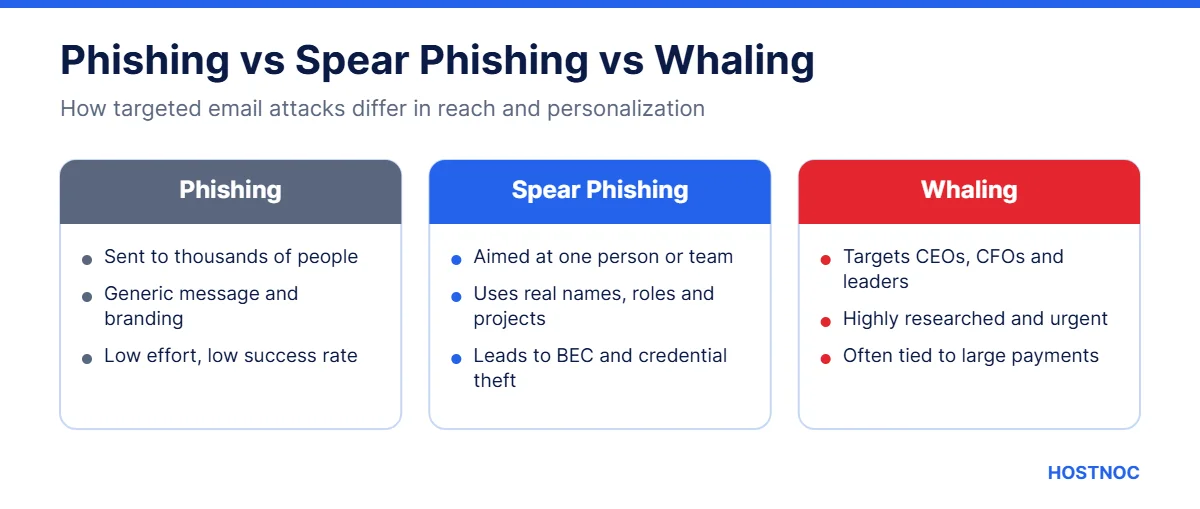
These terms are related but not the same. The table below shows the key differences.
| Attack Type | Target | Level of Personalization |
|---|---|---|
| Phishing | Thousands of random users | Low, generic messages |
| Spear phishing | A specific person or team | High, uses real names and details |
| Whaling | Senior executives (CEO, CFO) | Very high, often tied to large payments |
Whaling is simply spear phishing aimed at top executives. Because leaders can approve payments and access sensitive data, a successful whaling attack can be extremely costly.
How Do Spear Phishing Attacks Work?
Most spear phishing attacks follow a clear pattern:
- Research: The attacker gathers details about the target from public sources and earlier data leaks.
- Impersonation: They spoof or register a look-alike domain, or take over a real email account.
- The hook: They send a convincing email with an urgent request, link or attachment.
- The action: The victim enters a password on a fake login page, opens malware, or sends money.
- Exploitation: The attacker uses the access or funds, and may launch more attacks from inside.
Attackers increasingly use AI tools to write flawless, natural-sounding emails. The old advice of “look for spelling mistakes” is no longer enough.
Common Types of Spear Phishing Attacks
Spear phishing attacks come in several forms. Knowing them makes it easier to spot a fake.
CEO Fraud and Business Email Compromise
An email that seems to come from a senior leader asks finance staff to make an urgent, confidential payment. The pressure and secrecy are designed to stop the employee from checking.
Fake Invoices and Vendor Fraud
Attackers pose as a real supplier and send an invoice with “updated” bank details. The payment goes straight to the criminal’s account.
Credential Harvesting
The email links to a fake Microsoft 365, Google Workspace or banking login page. Any password entered there is captured by the attacker.
Malicious Attachments
A document or ZIP file that looks like a CV, contract or report contains malware. Opening it can install spyware or even lead to ransomware attacks.
Real-World Spear Phishing Scenarios
Spear phishing attacks often look like ordinary business. Here are three typical scenarios that catch companies out every day.
The urgent CFO request. On a Friday afternoon, an accounts assistant gets an email from the “CFO” asking for an urgent transfer to close a confidential deal. The address looks right, the signature is copied from a real email, and the CFO is known to be travelling. Without a call-back rule, the money is gone before Monday.
The supplier bank change. A long-time vendor emails to say they have switched banks and attaches a new invoice. In reality, the vendor’s mailbox was hacked weeks ago, and the attacker simply waited for the right moment. Because the email comes from a real account, filters do not block it.
The shared document. An employee receives a message saying a colleague has shared a file. The link opens a perfect copy of the Microsoft 365 sign-in page. The password entered there is used minutes later to log in, read email and launch more spear phishing attacks from inside the company.
How AI Is Changing Spear Phishing Attacks
Artificial intelligence has made spear phishing attacks faster and more convincing. Attackers now use AI to:
- Write flawless emails in any language and tone
- Summarize a target’s public profiles to personalize messages at scale
- Clone voices for follow-up phone calls that “confirm” a fake request
- Create realistic fake websites and documents in minutes
This means technical controls and verification habits matter more than ever. If a request involves money, passwords or sensitive data, confirm it through a separate, trusted channel every time.
Warning Signs of a Spear Phishing Email
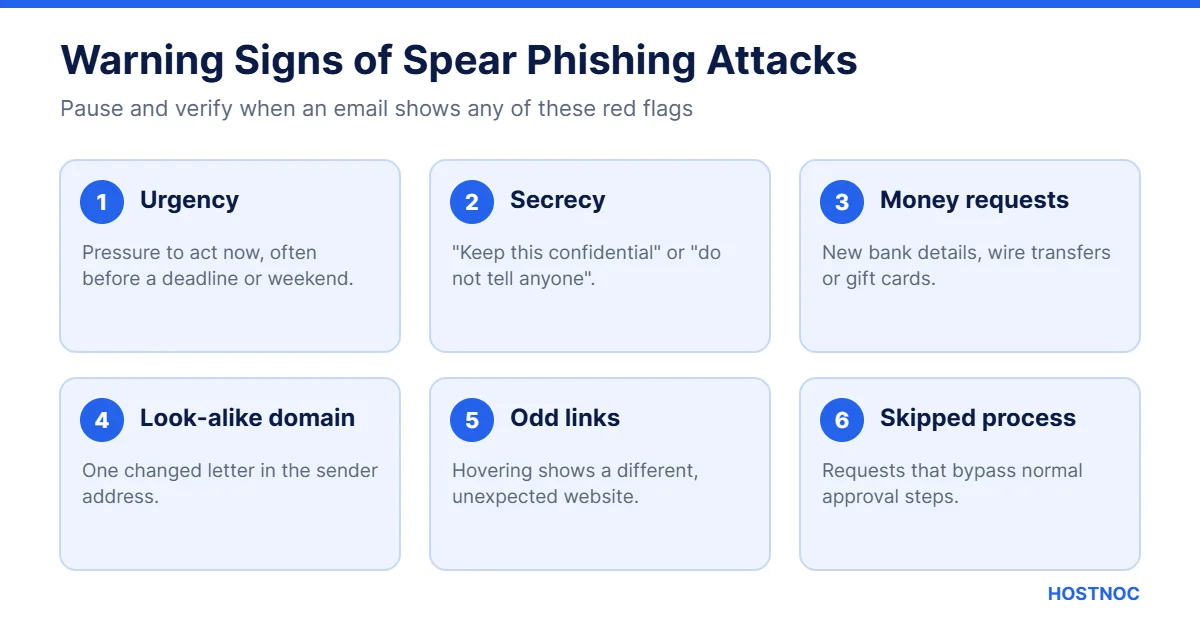
Even a well-written email often leaves clues. Be careful when you see:
- A sense of urgency or secrecy (“do this now, don’t tell anyone”)
- Requests to change bank details or buy gift cards
- A sender address that is slightly different from the real domain
- Links that point to a different website when you hover over them
- Unexpected attachments, especially ZIP or macro-enabled files
- A request that bypasses your normal approval process
If an email asks you to move money or share a password, pause and verify it through a different channel. That single habit stops most spear phishing attacks.
7 Effective Ways to Protect Your Business from Spear Phishing Attacks
Here are seven proven steps for spear phishing prevention. They work best when combined.
1. Make Cyber Security a Business Priority
Spear phishing prevention starts with leadership. If security is treated as “an IT problem,” gaps will remain.
Create clear security policies and share them with every employee. Build an incident response plan, so everyone knows what to do if they click a bad link. Review who has access to sensitive systems, and remove access that is no longer needed. Keep an eye on new tactics attackers use against businesses in your industry.
2. Keep Security Patches Up to Date
Many spear phishing attacks deliver malware that exploits old software flaws. Installing patches quickly removes those weaknesses.
Turn on automatic updates for operating systems, browsers and office software. Prioritize email servers, VPNs and anything exposed to the internet. A server management service can make sure updates are never missed.
3. Encrypt Your Sensitive Information
Your data lives in many places: laptops, servers, cloud storage, USB drives and backups. Encrypting it means that even if attackers steal a device or file, they cannot read the contents.
Use full-disk encryption on company laptops, encrypt databases that hold customer data, and make sure all web traffic runs over HTTPS. Our guide to the SSL certificate chain explains how secure connections are verified.
Keep Your Business Email and Servers Secure
HOSTNOC’s managed hosting and expert support help you patch, monitor and protect the systems attackers target most.
4. Educate and Test Your Employees
Employees are the main target of spear phishing attacks, so they must also be your first line of defense.
- Run short, regular training sessions instead of one long annual course
- Send simulated phishing emails to measure progress
- Teach staff to hover over links and check sender addresses
- Make reporting easy with a “Report Phishing” button
- Thank people who report, even when it turns out to be safe
A culture where people feel comfortable asking “is this real?” is far more effective than one built on blame.
5. Implement Multi-Factor Authentication
Strong passwords help, but they are not enough. Multi-factor authentication (MFA) adds a second step, such as an authenticator app or hardware key, before anyone can log in.
Even if a spear phishing email steals a password, MFA stops the attacker from using it. Enable MFA on email, VPN, cloud apps, admin panels and finance systems first. Phishing-resistant options, such as hardware security keys, offer the strongest protection.
6. Verify Requests and Monitor Email Activity
Always double-check unusual requests before acting. If an email asks for a payment, a bank detail change or sensitive data, call the sender using a phone number you already have, not the one in the email.
Set up a rule that every new payee or bank detail change requires a second approval. Monitor email logs for suspicious forwarding rules, logins from new countries and mass downloads, as these often follow a successful attack.
7. Take Advantage of DMARC Technology
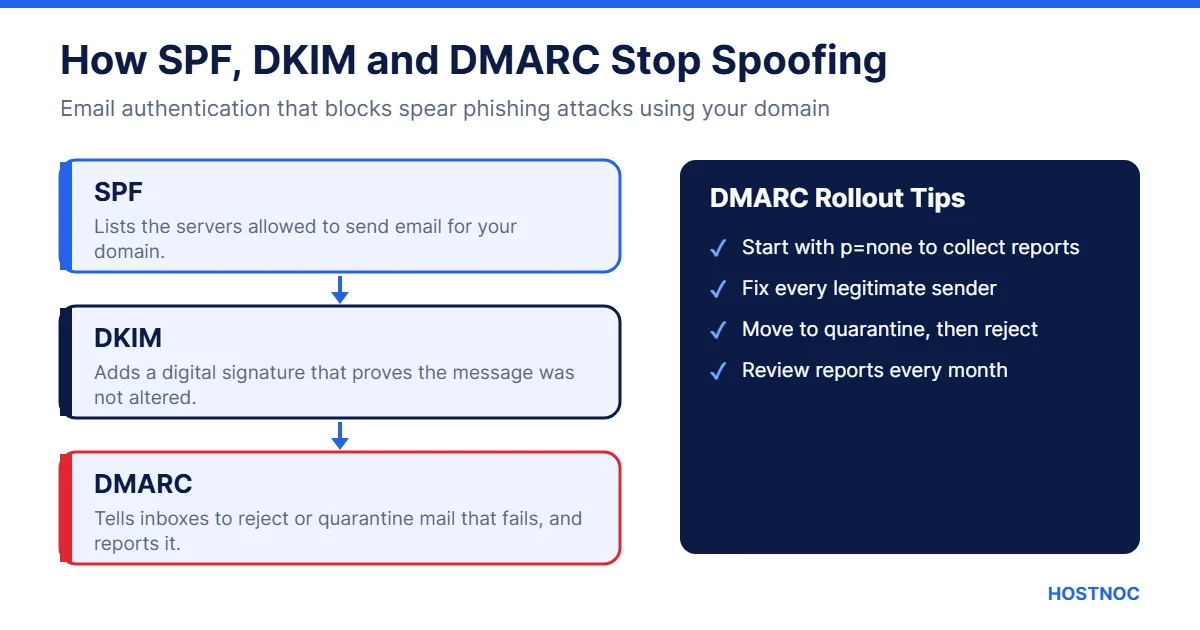
DMARC stands for Domain-based Message Authentication, Reporting and Conformance. It works with SPF (Sender Policy Framework) and DKIM (DomainKeys Identified Mail) to confirm that an email really comes from the domain it claims.
When an email fails these checks, DMARC can tell receiving servers to quarantine or reject it, and it sends reports to your security team. This makes it much harder for criminals to spoof your domain in spear phishing attacks against your staff, customers and partners. The DMARC.org website has a helpful overview for getting started.
Patrick Peterson summed it up well when he said:
A very important aspect in email security is making sure your email provider uses technology like DMARC. It’s the only email authentication protocol that ensures spoofed emails do not reach consumers and helps maintain company reputation.
Spear Phishing Prevention Checklist
Use this quick checklist to review your defenses against spear phishing attacks.
| Control | Why It Matters | Priority |
|---|---|---|
| DMARC, SPF and DKIM | Stops domain spoofing | Critical |
| MFA on all key accounts | Blocks use of stolen passwords | Critical |
| Payment verification process | Prevents BEC wire fraud | Critical |
| Employee training | Helps staff spot fake emails | High |
| Email filtering | Blocks known malicious messages | High |
| Patching | Removes flaws used by malware | High |
| Encryption | Protects stolen data | Medium |
What to Do If You Fall for a Spear Phishing Email
Mistakes happen. Fast action can limit the damage:
- Report it to your IT or security team immediately.
- Change the affected password and sign out of all sessions.
- Disconnect the device from the network if you opened an attachment.
- Contact your bank right away if money was sent; quick action may recover funds.
- Check for new email forwarding rules or unknown app permissions.
- Report the incident to the FBI’s IC3 (in the US) or your local authority.
Speed matters. The sooner a spear phishing incident is reported, the more likely it can be contained.
Building a Security-Aware Culture
Technology alone cannot stop every spear phishing attack. The businesses that resist these threats best have a culture where security is everyone’s job.
- Lead by example: When managers follow verification rules, staff do too.
- Keep it simple: Short, clear policies are easier to follow than long manuals.
- Reward reporting: Celebrate employees who flag suspicious emails.
- Share real examples: Show staff actual phishing attempts your company has received.
- Review regularly: Update training as attackers change tactics.
Over time, these habits turn every employee into a sensor that helps catch spear phishing attacks before they cause harm.
Why Secure Hosting Helps
Your email and web servers are prime targets in spear phishing attacks. A hosting provider that keeps systems patched, monitors for threats and supports proper email authentication reduces your risk significantly.
HOSTNOC offers dedicated servers and managed cloud hosting with expert support around the clock. For a broader look at today’s threat landscape, read our summary of the IBM X-Force 2026 Threat Intelligence Index.
Ready to Strengthen Your Security?
Talk to HOSTNOC about secure, managed hosting built to keep attackers out and your business online.
Conclusion
Spear phishing attacks succeed because they feel personal and urgent. Attackers do their homework, and with AI tools their emails are more convincing than ever.
You can still stay ahead. Make security a priority, patch your systems, encrypt sensitive data, train your team, turn on MFA, verify unusual requests and set up DMARC. Together, these steps make your business a much harder target and protect your money, data and reputation.
Start with the quick wins this week: enable MFA on email, publish a DMARC record, and agree a simple rule that every payment change must be confirmed by phone. Then build a regular training rhythm so your team keeps getting sharper.
FAQs
Spear Phishing Attacks: Frequently Asked Questions
Quick answers about spotting and stopping targeted phishing emails.
What is the difference between phishing and spear phishing attacks?
Phishing sends generic emails to many people at once. Spear phishing attacks target a specific person or team and use real names, roles and details to appear legitimate.
Who is most at risk of spear phishing?
Finance staff, executives, HR teams and IT administrators are common targets because they can approve payments, access employee data or control systems.
Can DMARC stop all spear phishing attacks?
No. DMARC stops attackers from spoofing your exact domain, but it cannot block look-alike domains or hacked accounts. Combine it with training, MFA and payment verification.
How can I tell if an email is a spear phishing attempt?
Watch for urgency, secrecy, unusual payment requests, slightly misspelled sender domains and links that lead to unexpected websites. When in doubt, verify by phone.
What should I do if I clicked a spear phishing link?
Report it to IT immediately, change your password, sign out of all sessions and disconnect the device if you opened an attachment. Fast reporting limits the damage.

Featured Post
Top 20 n8n Hosting Security Best Practices
20 proven n8n hosting security best practices covering HTTPS, authentication, secrets, Docker,...


7 Key Takeaways From IDC AI in Networking Report 2026
Artificial intelligence is widely expected to transform enterprise networking, but the IDC...


7 Key Takeaways from the IBM X-Force 2026 Threat Intelligence Index
The IBM X-Force 2026 Threat Intelligence Index shows a cyber threat landscape...
Follow us on:


Get the Latest News & Deals
Sign up to receive the latest news, updates and special offers from HostNOC.
I'd like to receive: