


Knowing how to prevent DDoS attacks is now essential for any business that depends on its website, apps or online services. These attacks flood your servers with fake traffic until real customers cannot get through. The result is downtime, lost sales and frustrated users.
The threat is growing fast. According to Cloudflare’s 2025 DDoS threat report, the company mitigated 47.1 million DDoS attacks in 2025, more than double the year before. It also recorded a new record attack peaking at 31.4 Tbps, which lasted just 35 seconds. Short, massive bursts like this can knock an unprotected site offline before anyone has time to react.
🔑 Key Takeaways
- DDoS attacks overwhelm servers with junk traffic, making websites and apps unavailable to real users.
- There are three main types: volume-based, protocol and application layer attacks.
- To prevent DDoS attacks, use layers: a response plan, cloud-based mitigation, a WAF, rate limiting and a resilient network.
- Always-on protection matters because many attacks now last only minutes.
- Your hosting provider plays a major role in how well you can absorb and filter attack traffic.
In this guide, HOSTNOC explains what DDoS attacks are, how they work, and eight proven ways to prevent DDoS attacks and keep your business online.
☰ Table of Contents (click to expand)
- What Is a DDoS Attack?
- How Do DDoS Attacks Work?
- Types of DDoS Attacks
- Why Do Attackers Launch DDoS Attacks?
- The Real Cost of DDoS Downtime
- Industries Most Targeted by DDoS Attacks
- Warning Signs of a DDoS Attack
- How to Prevent DDoS Attacks: 8 Proven Ways
- 1. Develop a DDoS Incident Response Plan
- 2. Use Cloud-Based DDoS Mitigation
- 3. Deploy a Web Application Firewall (WAF)
- 4. Apply Rate Limiting
- 5. Build a Resilient Network Infrastructure
- 6. Monitor Traffic and Look Out for Red Flags
- 7. Keep Systems Patched and Hardened
- 8. Partner with a DDoS Protection Service
- Common Mistakes When Trying to Prevent DDoS Attacks
- DDoS Protection for Small Businesses
- What to Do During a DDoS Attack
- DDoS Protection Checklist
- Why Your Hosting Provider Matters
- Conclusion
- FAQs
What Is a DDoS Attack?
A DDoS (Distributed Denial of Service) attack is an attempt to make a website, server or network unavailable by flooding it with more traffic than it can handle. The traffic comes from many sources at once, usually a botnet of hacked computers, servers, routers and IoT devices.
Because the requests arrive from thousands of different IP addresses, simply blocking one source does not work. The server becomes overloaded and stops responding to legitimate visitors.
The core goal is disruption. Attackers want to take your services offline, damage your reputation, or distract your security team while they attempt another attack in the background. You can learn more in our overview of DDoS attacks.
How Do DDoS Attacks Work?
Every server and network has limits on bandwidth, connections and processing power. A DDoS attack pushes past those limits on purpose.
- Building a botnet: The attacker infects devices with malware or rents an existing botnet.
- Choosing a target: They pick an IP address, domain or specific page, such as a login or checkout.
- Launching the flood: All bots send traffic at the same time, often in short, intense bursts.
- Overloading resources: Bandwidth, CPU, memory or connection tables fill up.
- Denial of service: Real users see slow pages, timeouts or error messages.
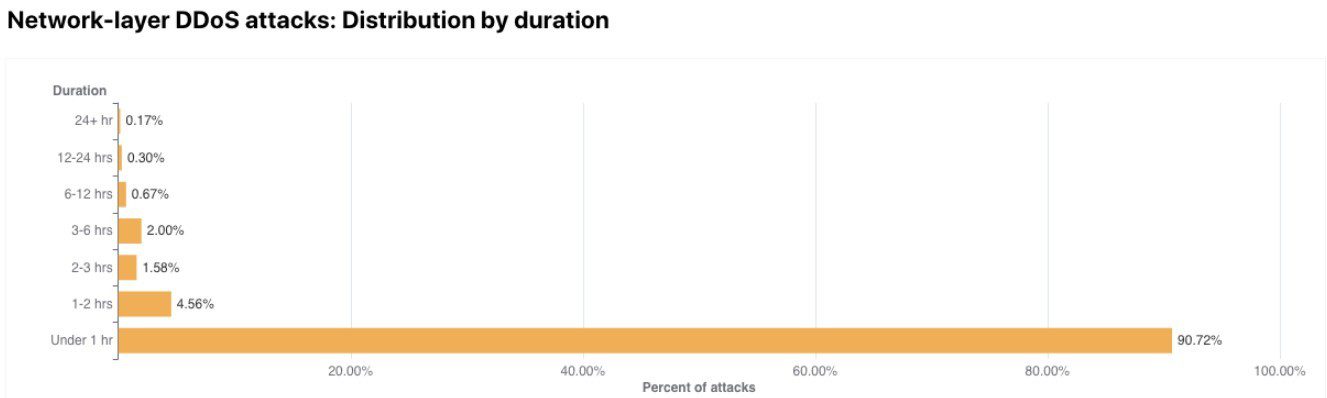
Today, many attacks are hit-and-run. They last only a few minutes, which makes manual response far too slow. This is a key reason you need automated tools to prevent DDoS attacks.
Types of DDoS Attacks
There are three main types of DDoS attacks. Each one targets a different part of your infrastructure.
Volume-Based Attacks
Volume-based attacks try to use up all your bandwidth with huge amounts of traffic. They are measured in bits per second (bps).
- UDP floods
- ICMP (ping) floods
- DNS and NTP amplification attacks
- Spoofed packet floods
Protocol Attacks
Protocol attacks exhaust server resources or network equipment such as firewalls and load balancers. They are measured in packets per second (pps).
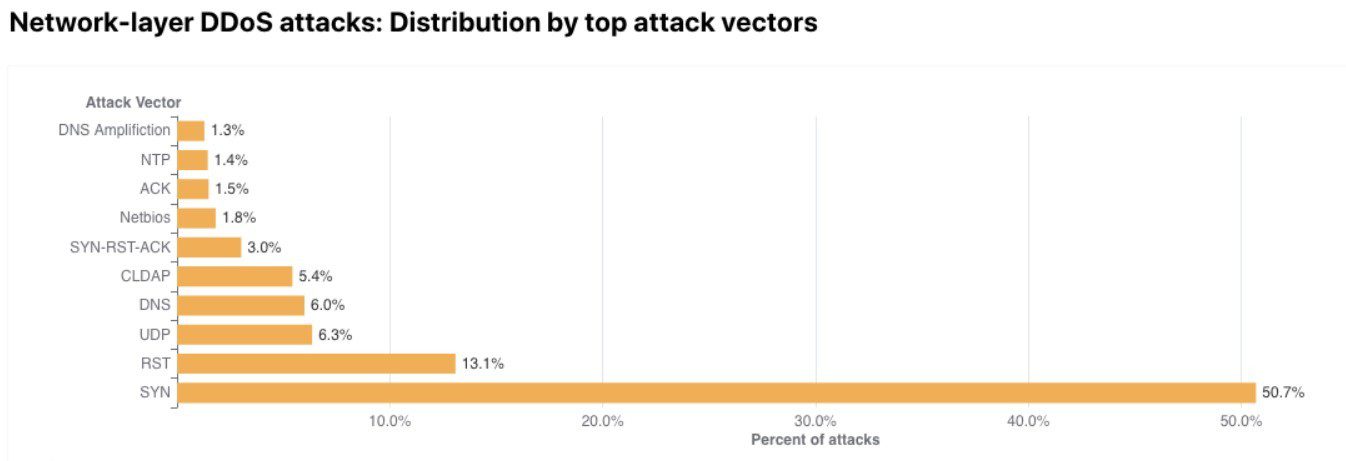
- SYN floods
- Ping of Death
- Smurf attacks
- Fragmented packet attacks
Application Layer Attacks
Application layer (Layer 7) attacks send requests that look legitimate, but in huge numbers. They target web pages, APIs and login forms, and are measured in requests per second (rps).
- HTTP GET and POST floods
- Low-and-slow attacks such as Slowloris
- Attacks on known weaknesses in web servers and applications
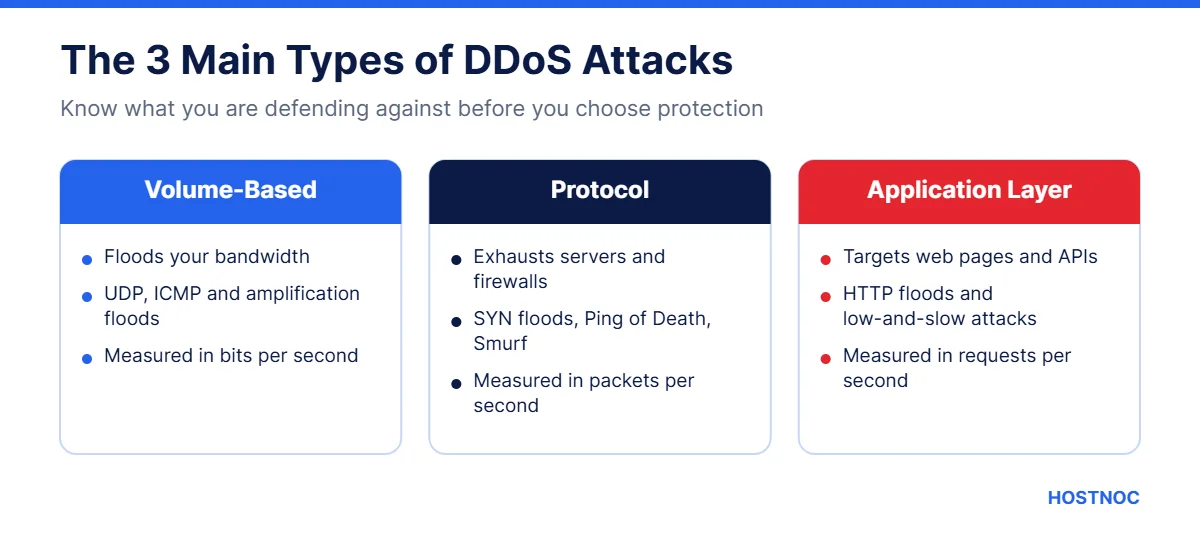
| Attack Type | What It Targets | Measured In |
|---|---|---|
| Volume-based | Network bandwidth | Bits per second (bps) |
| Protocol | Server and firewall resources | Packets per second (pps) |
| Application layer | Web apps, APIs and login pages | Requests per second (rps) |
Why Do Attackers Launch DDoS Attacks?
Understanding motives helps you judge your risk. Common reasons include:
- Extortion: Criminals demand payment to stop or prevent an attack.
- Competition: Rivals may try to disrupt a business during a busy sales period.
- Hacktivism: Groups target organizations for political or ideological reasons.
- Cyber warfare: State-linked groups target infrastructure and public services.
- Distraction: A DDoS attack can cover up a data breach happening at the same time.
The Real Cost of DDoS Downtime
Many businesses underestimate what a DDoS outage really costs. The damage goes well beyond a few minutes of downtime.
- Lost revenue: Online stores and booking sites lose sales every minute they are offline.
- Lost productivity: Staff cannot use internal tools, email or customer systems.
- Damaged reputation: Customers lose trust when a site is regularly slow or unavailable.
- SEO impact: Repeated outages can make it harder for search engines to crawl your pages.
- Recovery costs: Emergency mitigation, extra bandwidth and staff overtime add up quickly.
When you compare these costs with the price of protection, it becomes clear why it pays to prevent DDoS attacks rather than react to them.
Industries Most Targeted by DDoS Attacks
Any business with an online presence can be hit, but some sectors face more attacks than others:
- E-commerce and retail, especially during sales seasons
- Gaming platforms and game servers, where even short lag drives players away
- Financial services, banks and payment providers
- Healthcare and education, which often run older systems
- SaaS and hosting companies, because one attack can affect many customers
- Government and public services, often for political reasons
If your business is in one of these sectors, plan your defenses now. The steps below show how to prevent DDoS attacks no matter what industry you are in.
Warning Signs of a DDoS Attack
The faster you spot an attack, the faster you can respond. Watch for:
- A sudden, unexplained spike in traffic from one region or network
- Pages loading very slowly or timing out
- Many requests to a single URL, such as a login page
- Unusual traffic patterns at odd hours
- Server resources maxing out with no matching rise in sales or signups
Some of these signs overlap with other threats. See our list of cyber security red flags for more.
How to Prevent DDoS Attacks: 8 Proven Ways
No single tool can stop every attack. The best way to prevent DDoS attacks is to combine several layers of protection.
1. Develop a DDoS Incident Response Plan
Start with a security assessment of your network, servers and applications. Find out which services are critical and where your weak points are.
Then build a response plan. It should name who is in charge, how to contact your hosting provider and mitigation service, how to reroute traffic, and how to update customers. When an attack hits, you will act quickly instead of scrambling.
2. Use Cloud-Based DDoS Mitigation
Cloud-based mitigation services have massive networks that can absorb huge volumes of traffic. They filter bad requests at the edge and send only clean traffic to your servers.
When you choose a provider, check that DDoS protection is included, always on, and able to handle both network and application layer attacks. This takes a big burden off your in-house IT team.
3. Deploy a Web Application Firewall (WAF)
A web application firewall sits between your website and the internet. It inspects incoming requests and blocks malicious ones, such as bot floods targeting login or search pages.
A good WAF also protects against other web threats, such as SQL injection and cross-site scripting. Many WAFs can also improve performance by caching content.
Keep Your Website Online Under Pressure
Host on HOSTNOC dedicated servers with expert support, so your business stays fast, stable and secure.
4. Apply Rate Limiting
Rate limiting caps how many requests a single IP address or user can make in a set time. It is one of the simplest ways to prevent DDoS attacks at the application layer.
Apply stricter limits to sensitive endpoints such as logins, search, checkout and APIs. Combine rate limiting with bot detection or CAPTCHA challenges for suspicious traffic.
5. Build a Resilient Network Infrastructure
A single server in a single location is easy to overwhelm. Spread the load instead.
- Use load balancers to share traffic between several servers
- Serve static content through a content delivery network (CDN)
- Host services in more than one data center
- Keep spare bandwidth for unexpected spikes
- Hide your origin server’s IP address behind your protection layer
6. Monitor Traffic and Look Out for Red Flags
Multi-layered security is powerful, but you still need to watch your traffic. Set a baseline for normal activity, then use alerts for unusual spikes.
Take a proactive approach. Real-time monitoring helps you spot attacks in seconds and adjust your filters quickly. It also helps you catch other threats, such as a ransomware attack, early.
7. Keep Systems Patched and Hardened
Attackers often exploit known weaknesses in web servers, operating systems and network devices. Regular updates close those gaps.
Disable services you do not use, close unused ports, and secure IoT devices on your network so they cannot be recruited into a botnet. A managed server management service can handle this work for you.
8. Partner with a DDoS Protection Service
As attacks have grown, so has the number of providers offering DDoS protection as a service. These providers combine cloud scrubbing, on-site tools and expert teams to deliver round-the-clock defense.
The biggest benefit is a security setup tailored to your business. Whether you run a small online store or a large enterprise platform, a specialist partner can help you prevent DDoS attacks and meet compliance requirements.
The best time to prepare for a DDoS attack is before it starts. Once the flood arrives, you only have minutes to react.
Common Mistakes When Trying to Prevent DDoS Attacks
Even businesses that invest in security can leave gaps. Avoid these common mistakes:
- Relying only on your server’s firewall. A large flood can overwhelm it before rules even apply.
- Exposing your origin IP. If attackers find your real server address, they can bypass your CDN or WAF.
- Using on-demand protection only. Short attacks can end before manual activation even starts.
- Ignoring the application layer. Many businesses protect bandwidth but forget login pages and APIs.
- Never testing the plan. A response plan that has never been rehearsed often fails under pressure.
Fixing these issues is often quick and inexpensive, yet it greatly improves your ability to prevent DDoS attacks from causing real damage.
DDoS Protection for Small Businesses
You do not need an enterprise budget to stay protected. Small businesses can prevent DDoS attacks with a few smart, affordable choices:
- Choose a hosting provider with network-level DDoS filtering included.
- Put your website behind a CDN with built-in protection.
- Turn on basic WAF and rate limiting rules for logins and forms.
- Keep your CMS, plugins and server software updated.
- Write a one-page response plan with key contacts.
These steps cover the most common threats and give you time to respond if a larger attack arrives.
What to Do During a DDoS Attack
If you are already under attack, follow these steps:
- Confirm it is an attack, not a genuine traffic spike from a campaign or news mention.
- Contact your hosting provider and DDoS mitigation service right away.
- Turn on stricter rate limits and challenge suspicious traffic.
- Block or filter traffic from abusive IP ranges or regions if appropriate.
- Keep customers informed through social media or a status page.
- After the attack, review logs and update your response plan.
DDoS Protection Checklist
Use this checklist to see how well your business can prevent DDoS attacks.
| Control | Benefit | Priority |
|---|---|---|
| Incident response plan | Faster, calmer response | Critical |
| Cloud DDoS mitigation | Absorbs large attacks | Critical |
| Web application firewall | Blocks Layer 7 floods | Critical |
| Rate limiting | Protects logins and APIs | High |
| CDN and load balancing | Spreads traffic and load | High |
| Traffic monitoring | Early detection | High |
| Patching and hardening | Removes easy targets | Medium |
Why Your Hosting Provider Matters
Your hosting provider is your first line of defense. A provider with strong network capacity, upstream filtering, expert support and quick response times can make the difference between a short blip and a long outage.
HOSTNOC offers dedicated servers, managed cloud hosting and VPS hosting backed by a team that understands security. For a wider view of current threats, read our guide to cybersecurity trends for 2026.
Need Help Protecting Your Servers?
Talk to the HOSTNOC team about secure hosting that keeps your website online when it matters most.
Conclusion
DDoS attacks are bigger, faster and more frequent than ever. But with the right preparation, you can keep your business online.
To prevent DDoS attacks, start with a response plan and always-on cloud mitigation. Add a WAF, rate limiting, a resilient network, real-time monitoring and regular patching. Finally, choose a hosting partner that takes security as seriously as you do.
Do not wait for an outage to test your defenses. Review your setup this month, run a simple drill with your team, and confirm your provider’s response process. A few hours of preparation now can save days of downtime later.
If you are unsure where to start, ask your hosting provider three simple questions: what DDoS filtering is included, how fast they respond during an attack, and who you should contact first. Their answers will show you exactly where your gaps are.
FAQs
How to Prevent DDoS Attacks: Frequently Asked Questions
Quick answers about DDoS attacks and protection.
Can you completely prevent DDoS attacks?
You cannot stop attackers from trying, but you can prevent DDoS attacks from taking you offline. Layered protection with cloud mitigation, a WAF and rate limiting filters most attack traffic.
What is the difference between DoS and DDoS?
A DoS attack comes from one source, while a DDoS attack uses many sources, usually a botnet. DDoS attacks are much harder to block because traffic comes from thousands of IP addresses.
How long do DDoS attacks last?
Many modern attacks last only minutes, while some continue for hours or days. Short bursts are common, which is why automated, always-on protection is so important.
Does a firewall stop DDoS attacks?
A traditional firewall alone can be overwhelmed. A web application firewall combined with cloud-based mitigation and rate limiting is far more effective.
Are small businesses targeted by DDoS attacks?
Yes. Online stores, gaming servers, SaaS tools and local service sites are all targets, often for extortion or competitive reasons.

Featured Post


7 Steps to Safeguarding Your Website Against DDoS Attacks
You have just started a business and set up its dedicated website....

Follow us on:


Get the Latest News & Deals
Sign up to receive the latest news, updates and special offers from HostNOC.
I'd like to receive: